Built for farmers · English + Español

The Operating System for Farm Operations

AgCommand creates a permanent operational record for every field — connecting people, activities, compliance, labor, equipment, and decisions into one operational timeline.

Know what’s happening. Prove what happened. Preserve what works.

Concept view · Demonstration data only · Imagery © Esri

Capture once. Use everywhere.◆ Built for the people who use it.◆ Built with partners, not for them.

Built For Farmers

Built for farmers. Understood in the field.

Good farm software has to be understood by the people using it — not only by the people who built it.

AgCommand was shaped in the field, around how farms already work and how farm people already talk. A foreman, an irrigator or a crew lead should be able to pick it up and know what to do.

If the crew can’t use it, it isn’t finished.

Speaks the language of the farm

Ranches, blocks, PCA recs, REI and PHI, crews and loads — the words your people already use, not software terms.

In their own language

English or Spanish, chosen by each person. A work order reaches each person written in the language they read.

Nothing to install

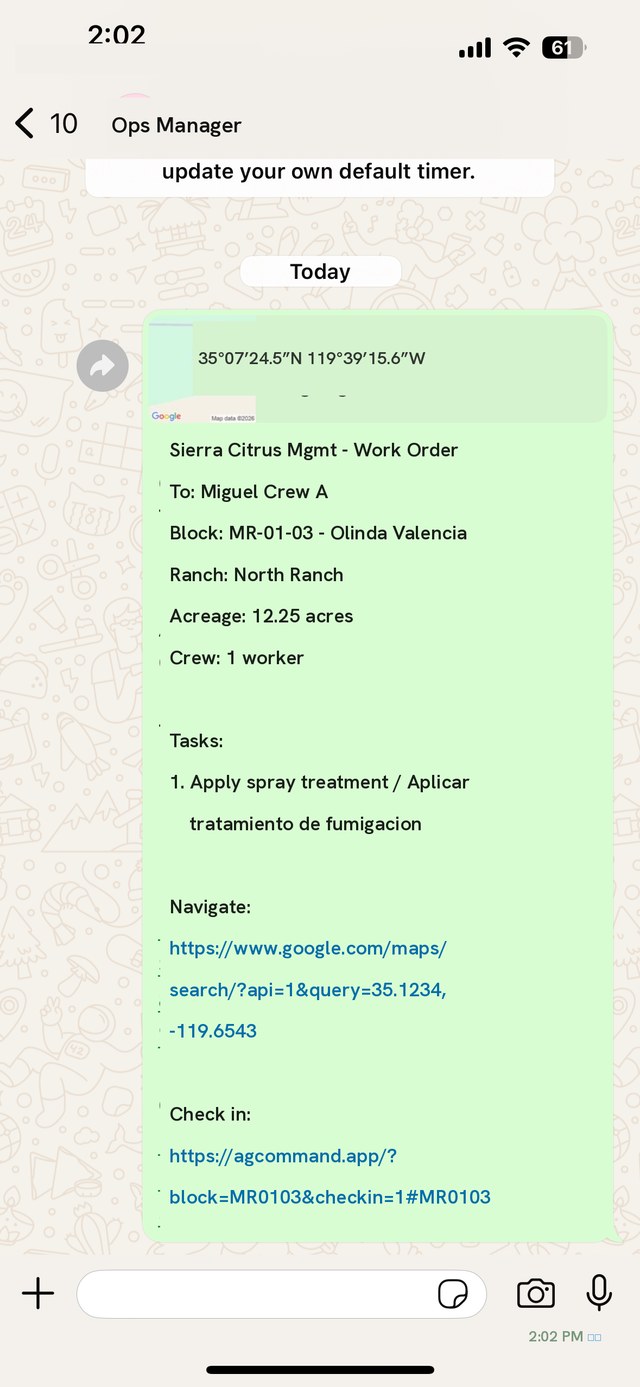
Crews get the job by WhatsApp. They tap the link, confirm the work and they’re on the record.

Only what’s needed next

Each person sees what they need to do the next thing correctly. A crew sees its own work, not the whole system.

Works where the work is

No signal in the back blocks? The record is saved on the phone and sends itself when signal returns.

The right step is the easy step

Restrictions show before a crew walks in, and a harvest waits until the block is clear — so doing it right is the simple path.

The Idea, In Ten Seconds

One platform. One timeline.

Every kind of field activity, captured where it happens — feeding one permanent record.

Most systems tell you what should happen.
AgCommand records what actually happened.

The Operational Record

Every field has a memory.

Every farming operation generates thousands of activities, conversations, decisions, inspections, and records each season. Most of that information disappears — into binders, group texts, and the memory of whoever was standing there.

AgCommand captures it all, the moment it happens — every spray with its REI window, every irrigation set, every crew check-in, every lot from field to buyer.

Every Field. Every Activity. One Record.

The Operational Record of the Farm

Three questions. One record.

AgCommand keeps track of what needs to happen on the farm, records what actually happened, and remembers it. Your people stop chasing information, and the farm builds a history that stays with it.

01

What’s happening?

Current operational state

What’s open, what’s restricted, what’s coming and what needs your attention today — for every field.

02

What happened?

Permanent operational history

Who did what, where and when — captured once, where the work happens, and kept with the field.

03

What worked?

Knowledge that improves the next decision

What it cost, what it returned and what to consider repeating — drawn from your own ground and your own results.

Operate better today. Prove what happened. Preserve what works.

The Living Map

Every acre, at a glance.

Field status, REI windows, crews on site, harvest readiness — across the whole operation, on real ground.

Inside the Platform

The software, up close.

Recreated from the working product — capture, assignment, and compliance, the way operations actually run them.

Capture

Logged in the moment, from the field.

Nine activity types, coverage down to the half-field, who performed it, photos, and the compliance document — all attached at the source.

Spanish or English. About forty-five seconds, start to finish.

Assign & Confirm

From your desk to the crew's pocket.

Pick the task, pick the crew, send — it lands as a WhatsApp work order, in Spanish, on the phone they already carry.

Check-in confirms it: QR scan, timestamp, GPS.

Prove It

Audit-ready is the default.

Reminders tied to the actual PrimusGFS clause. Audit packages organized the way the auditor expects them. Mock recalls run against Walmart's two-hour standard — with the timer running.

When the call comes, the answer is a button, not a binder.

Reminder · Due now Weekly sanitation log
Due in 1 dayPrimusGFS 2.05.022.05.03
Capture now
Mock recall · Step 1 of 6 Lot T-20260528-002 · Trifolium 11-220A

14 pallets → CoolFresh Packing, Brawley. Randomly selected — auditors don't let you cherry-pick.

TIMER RUNNING · WALMART STANDARD: TRACE BOTH WAYS IN 2 HRS

Compare Playbooks

A/B your own fields

corn-control-2026 · 3 fieldsbaseline
corn-supplement-2026 · 2 fields+ supplement
What's differentSupplement

Side-by-side field histories show what actually changed between programs — and what it did.

Crew Activity

QR check-in · GPS · Hours

RMR. Mendez — Crew 3 · SE 8-1556:02 · GPS ✓
CACrew A · 11-220A6:14 · GPS ✓
+12Full roster on site14 workers

Check-ins are timestamped and located. Hours roll up on their own.

Owner & Grower Reports

Weekly · Automatic

Activities logged318
Acres worked1,212
Exceptions flagged2

Ownership sees the operation without chasing it. Managed-land owners get a report for their own acres.
From the Working Product

Not a concept. In the field today.

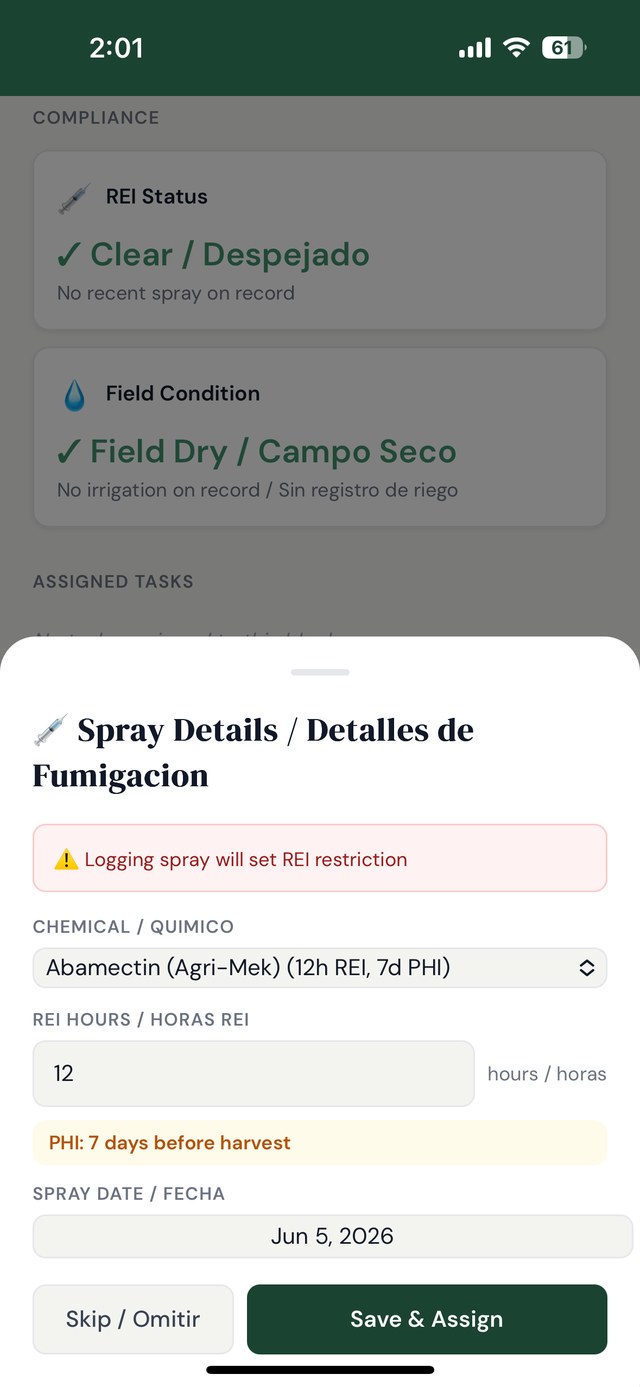
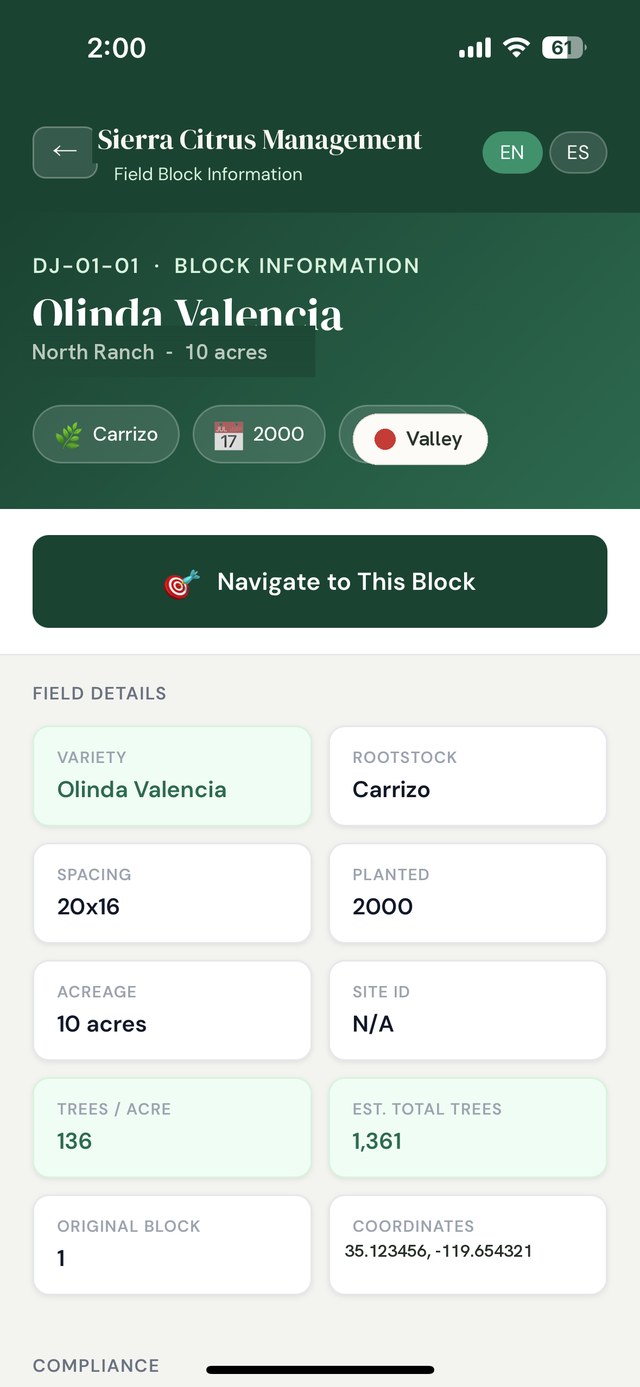
Screens from the working product — bilingual, REI-aware, one tap from WhatsApp. Demonstration data shown.

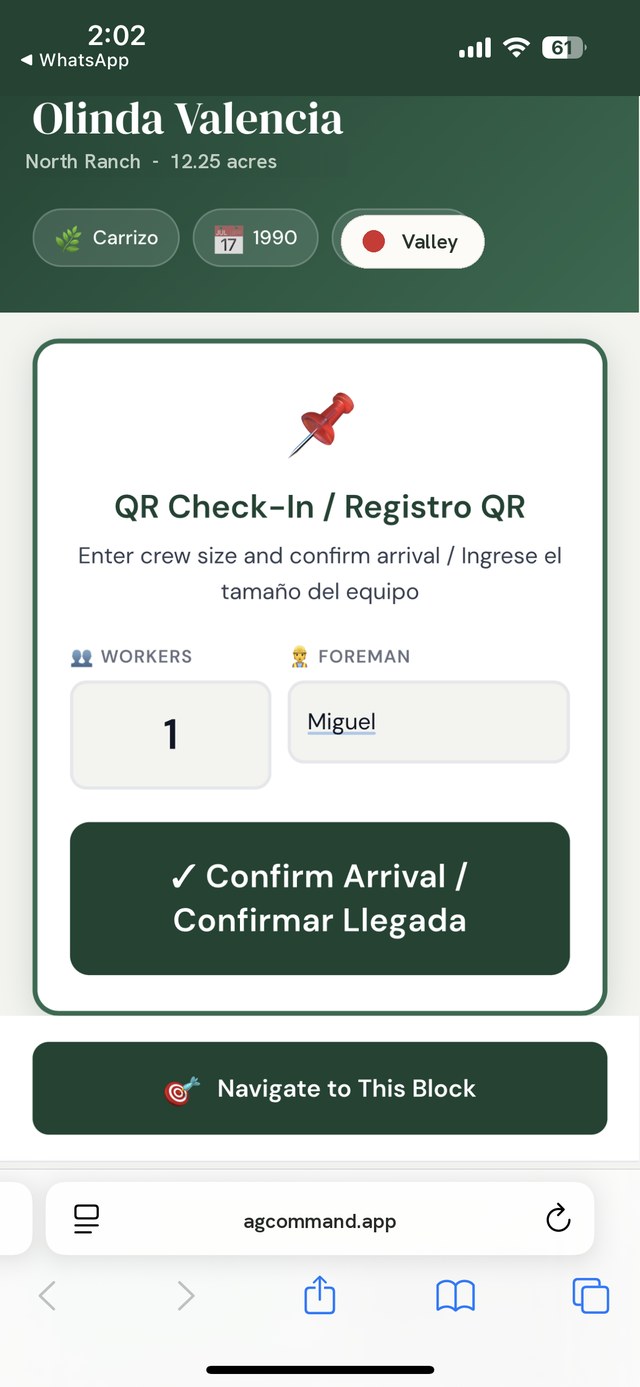
AgCommand spray details screen with REI hours and PHI warning, in English and Spanish
Spray · REI & PHI
AgCommand field block information screen showing variety, rootstock, spacing, and tree counts
Field identity
AgCommand QR check-in screen confirming crew arrival, in English and Spanish
QR check-in

Every field has an identity. Every crew has a check-in. Every spray sets its own restriction window.

How It Works In The Field

One task, start to finish.

An irrigation set, the way AgCommand sees it — from assignment to permanent record.

01Task assigned

Irrigation set — sent to the crew by WhatsApp, in Spanish.

02Crew checks in

QR scan at the field. Timestamped, GPS-verified.

03Work documented

Photo captured — attached to the field, not a camera roll.

04Task completed

Confirmed from the field, not from the office.

05Compliance record created

Water source, duration, operator — logged automatically.

06Timeline updated

11-220A remembers. Permanently.

From Rec To Report

From PCA rec to pesticide use report.

One spray, the way AgCommand sees it — captured once, and every record after it comes from there.

  1. The rec arrivesUpload the PCA’s TELUS/Agrian work order. AgCommand reads the products, EPA numbers, rates, REI, PHI and sites — and leaves blank anything it isn’t sure of.
  2. Blocks matched at the deskThe office confirms which blocks the rec covers, once — not at the field gate.
  3. Spray assignedThe applicator gets the job on their phone, in Spanish, linked to the rec.
  4. Applied and signedDriver and mixer recorded, weather filled in automatically, and the application signed and reviewed.
  5. REI and PHI start themselvesThe block turns red on the map. Re-entry counts down, and harvest stays blocked until the PHI clears.
  6. Pesticide use report, readyThe pesticide use report builds itself from the records and is filed in Documents — nothing retyped.
PCA work order PDF · TELUS / Agrian

Read from the PDF11-220

ProductAgriGuard 4EC
EPA Reg. No.00000-000
Rate2 pt / acre
REI24 hours
PHI7 days
Adjuvantnot found — left blank

A blank beats a wrong guess — a person fills it in.

Rec covers 11-220A and 11-220B · valid Aug 13–25

AgCommand5:48
Aplicación asignada11-220A · AgriGuard 4EC · 2 pt/acre
Mañana 6:00 AM · REI 24 h
Abrir trabajo
Recomendación del PCA adjunta ✓

What the applicator sees — in Spanish

Application record11-220A

DriverJ. Ramírez
MixerL. Ortega
Weather (auto)68°F · wind 4 mph NW
Rate applied2 pt / acre

Signed by the applicator · reviewed

REINo entry · clears Thu 6:00 AM23:59:59
PHIHarvest blocked until Aug 227 days

Pesticide use reportAugust

Applications14
Acres treated218.6
Products · EPA nos.6
Applicators3
Saved to DocumentsReady for the county

AgCommand doesn’t replace your PCA. It makes sure what was recommended is what was done.

Works With No Signal

Works where the signal doesn’t.

Fields don’t have reliable signal. AgCommand doesn’t need it. Every record is saved on the phone the moment it’s made, and sends itself when the phone finds signal again.

  • Saved instantly. Sprays, check-ins, harvest, food-safety logs, injury reports and photos — all work with no signal.
  • Sends itself. When signal returns, waiting records go up on their own. Nothing to retype.
  • Nothing lost. Waiting records survive the app closing, and the phone won’t sign out until they’re sent.
  • On the home screen. Add AgCommand like an app — it opens even with no service.

People & Records

Protect your people. Protect your records.

The hardest days on a farm come with the most paperwork. AgCommand has it ready — and keeps it in the right hands.

Worker Safety

When someone gets hurt, the paperwork is ready.

  • Reported in the field — what happened, where it hurts, photos of the scene.
  • Official forms filled in — DWC-1, Form 5020 and OSHA 300/301, from one report.
  • Signed on the phone — the worker reviews their part in Spanish and signs with a finger.
  • Medical information stays private — only owners and managers can open it.
DWC-1 · 1 working dayForm 5020 · 5 daysSerious injury · 8 hours

Deadlines tracked from the moment of the report. AgCommand prepares the forms for your review; it doesn’t replace your carrier or counsel.

Trust & Security

Your records, in the right hands.

  • Everyone signs in as themselves — every record carries the name of the person who made it.
  • Roles decide who sees what — Owner, Manager, Field staff. Crews never see settings, yields or medical records.
  • Private files — photos and documents open only for signed-in people, through links that expire.
  • Every change recorded — who changed what, and when.
  • Social Security numbers are never stored.

Why AgCommand

The record exists. It's just scattered.

Every operation generates thousands of activities a season — text messages, phone calls, paper notes, safety meetings, crew instructions, irrigation logs, harvest updates. The information exists. The problem is that it lives everywhere.

Where the record lives today

Spray logs in the shop truck. Harvest tickets in the office. Compliance documents in a filing cabinet — somewhere. Your accounting system and your ERP each keep their part well. The record of how the farm was actually run lives in texts, notebooks and people’s memory.

Spread across people and places.
Each department holds its own piece.
Written down after the work is done.
Hard to find when it’s needed.

The pieces exist. The record doesn’t.

AgCommand

Every spray, scout, irrigation set, harvest lot, and crew check-in lands on one timeline the moment it happens — timestamped, attributed, permanent.

Creates operational history.
Connects the whole operation.
Works alongside the systems you already use.
Captures the record while the work happens.

One timeline. One field history. One source of truth.

Why Operations Teams Choose AgCommand

Know what happened.
When it happened.
Where it happened.
Who performed it.
Why it mattered.
Across every field.
Minutes, not days.

Audit packages and trace-backs assemble from the record on demand — no binder hunt, no panic the week before the audit.

One source of truth.

Office, field, cooler, and buyer all read from the same timeline — in English and Spanish.

Nothing walks out the door.

Decisions, corrections, and field knowledge stay attached to the land — through every season and every handoff.

In Plain Words

How AgCommand thinks about the farm.

A few of the ideas the platform is built on.

Shared awareness

Information should belong to the field, not to a department.

Shared awareness

If a field is sprayed, Harvest shouldn’t have to wait for somebody from Spray to call them. The application changes that field’s status — for everyone who needs to know.

Managers & leadership

Your best people shouldn’t have to keep the operation in their heads.

Managers & leadership

Here’s where we are. Here’s what’s coming. Here’s what’s missing. Here’s what needs your attention.

Managers & leadership

Exceptions surface first, so management spends less time finding the problem and more time solving it.

Infrastructure, not just software

Your accounting system becomes the financial record of the company. Your ERP becomes the record of the fruit after harvest. AgCommand becomes the operational record of how the farm was actually run.

Simple to use

Complex operation. Simple interface. Only show the person what they need to know to do the next thing correctly.

Continuity

A new manager should inherit the record instead of rebuilding it.

Continuity

AgCommand doesn’t replace experienced people. It helps make what those people know durable.

Continuity

People change. Managers change. Ranches and crops change. The way the company operates shouldn’t disappear when somebody leaves — that should belong to the business.

Less chasing information. More operating the farm.

Generational Knowledge

The wisdom of the farmer, passed forward.

Every operation runs on knowledge that was never written down — which block seals after a rain, where the aphids show first, what the buyer will and won't take. That knowledge lives in people. And when they retire, it walks off the ranch with them.

AgCommand attaches that wisdom to the fields themselves. A veteran's notes, decisions, and corrections become part of each field's permanent record — and surface automatically for the next manager, the next foreman, the next generation.

Year one gives you records. Year two gives you comparisons. Over time, the operation builds a playbook based on its own ground, its own decisions and its own results.

Experience becomes record. Record becomes inheritance.

The Platform

Six capabilities. One record.

Capture once. Use everywhere — for the crew, the auditor, the buyer, and the owner.

01

Field Identity

Every field carries a permanent identity — boundaries, water sources, crop history, and every activity ever recorded on it.

02

Operational Timeline

Sprays, scouts, irrigation, harvest, and sanitation captured at the moment they happen, with REI/PHI windows tracked automatically.

03

Task Management

Assignments reach field crews where they already are — WhatsApp — with check-in confirmed by QR code, timestamp, and GPS.

04

Traceability

Every lot tracks from field to buyer, with mock recalls and trace-back / trace-forward exercises run on demand.

05

Compliance Documentation

A living document library aligned to PrimusGFS, GlobalG.A.P., and buyer audit standards — audit packages generated on demand.

06

Operational Visibility

Weekly operations reports for ownership and grower reports for managed-land owners, drawn directly from the record itself.

Also inside AgCommand

Food-safety logs

Signed daily and weekly logs, with a year calendar of what’s due and when.

Loads & receiving

Ship to receive: the cooler scans the BOL and confirms the pallet count. The handoff is on the record.

Yield & returns

Yield per acre and returns by source — estimated, interim, final.

Equipment

Equipment records, maintenance and service history.

Weather & degree days

Weather filled in on records automatically; degree days tracked by field.

Billing exports

Labor and diesel billed to the right field, exported for the office.

Who It's Built For

Built for the people who move produce.

Fully bilingual — English and Spanish — from the field to the front office.

01

Growers

Your operation's full record, from pre-plant to final load.

02

Farm Management Companies

One standard of record across every operation you manage.

03

Packing Houses

Lot continuity from the field through the cooler to the buyer.

04

Produce Brokers

Visibility across every grower under your umbrella.

05

Labor Contractors

Crew check-ins, hours, and task completion — documented.

06

Nurseries

Stock, treatments, and movement tracked from propagation out the door.

Founding Principles

Field Identity Accountability Traceability Operational Excellence Stewardship Faithful Execution

Ready to command your operation?

See how AgCommand brings clarity, accountability, and control to your operation — with your fields, your crews, your standards.

Request a demo
“Commit your work to the Lord, and your plans will be established.”
Proverbs 16:3